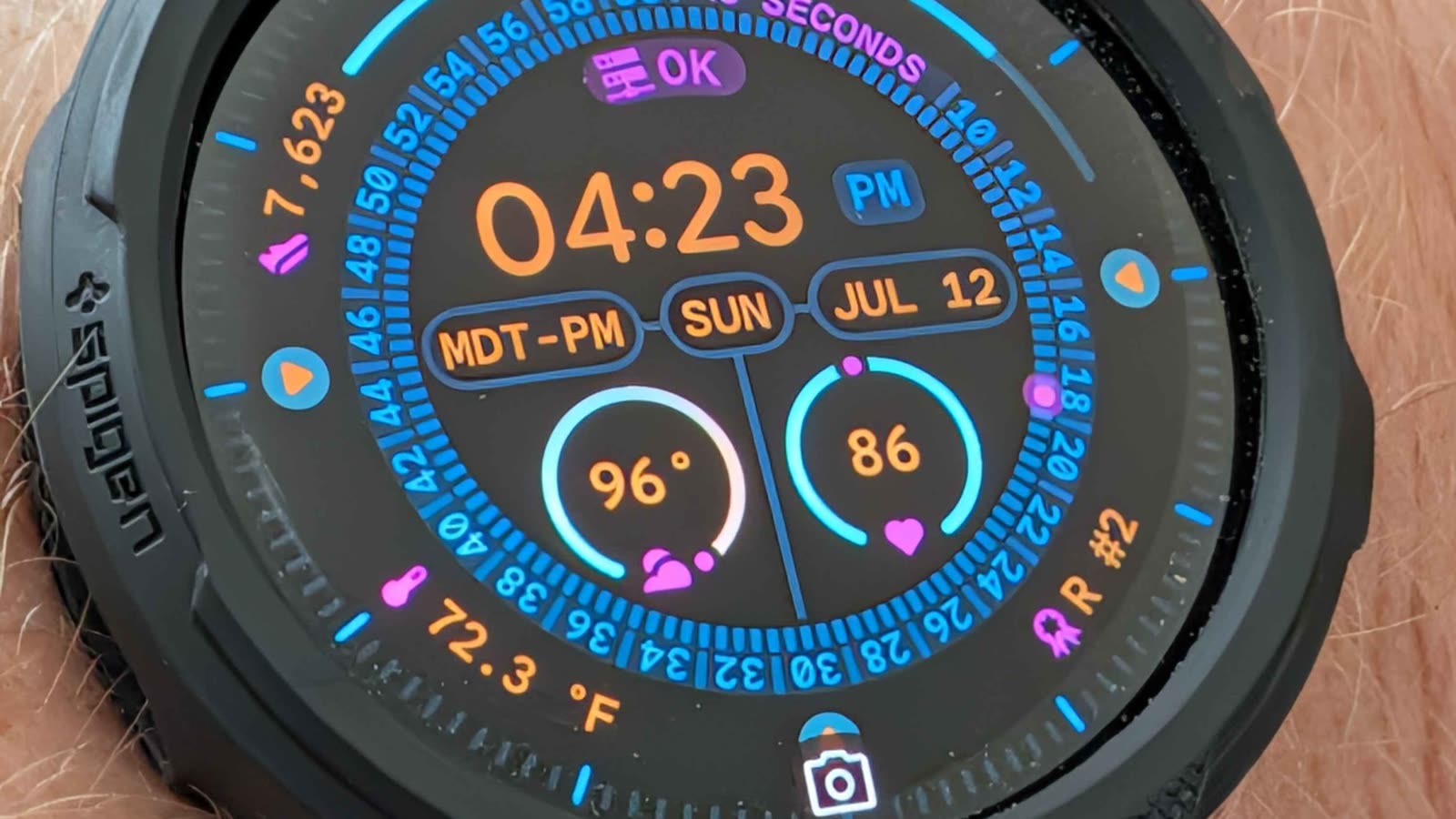
I did not want a dashboard on my wrist. I wanted two short answers:
- Does the homelab need my attention?
- What is my Swamp Club progress today?
That is enough to make the Pixel Watch useful without turning it into a tiny, frustrating phone.
I built the pipeline behind those two answers because neither was available as a ready-made watch complication. The interesting work was not putting an existing sensor on a watch face; it was deciding which state mattered, moving it through the stack, and learning which constraints only showed up on the actual watch.
The first answer is practical. A brief homelab status tells me whether something important is offline or degraded. The second is mostly fun, but it is also a small reminder that the automation work is doing something over time.
The architecture, in plain English
The score starts at Swamp Club. A Swamp model retrieves the current score snapshot, including rank, all-time points, and the points earned today. A small scheduled publisher sends that snapshot to MQTT every two minutes. Home Assistant receives it and turns the useful pieces into entities. The Home Assistant Companion App makes the final watch-facing entity available as a Pixel Watch complication.
Swamp Club → Swamp score model → MQTT → Home Assistant → Pixel Watch
Each part has one job:
- Swamp Club is the source of the score.
- The Swamp model gives the score a repeatable, structured shape instead of leaving it as a page I have to check manually.
- MQTT is the lightweight handoff between the scheduled check and Home Assistant.
- Home Assistant is where raw data becomes something useful to see: a current score, rank, and a short watch status.
- The Pixel Watch is just the surface. It should not need to understand the whole system.
That separation matters. The watch is not polling a website, running a model, or trying to interpret a large JSON response. It gets one small piece of state from the system already built to collect and organize it.
The Homelab Status Is Deliberately Simple
Most of the time, it says OK. That is the goal.
Behind that short word is a small health check that looks at the things I would actually want to know on a watch: whether the homelab is reachable and powered, whether the camera/NVR service is online, and whether there are important service or integration updates waiting. Home Assistant combines those checks into one status with a clear priority order.
If nothing needs attention, the complication stays quiet. If something does, it should say what is wrong in a few words—something like Frigate offline—rather than leave me with an empty icon or make me open a dashboard to interpret it. The watch is a prompt to investigate, not the place to diagnose the issue.
That is also why I keep a separate “needs attention” signal behind the short display. The friendly watch label is for a glance; the underlying state is for automations, notifications, and the fuller Home Assistant view when I need it.
A rolling status, not a tiny report
The score complication rotates when a fresh score snapshot arrives. It cycles through three compact values:
R #2for rankT 31.9Kfor today’s pointsA 2.52Mfor all-time points
The exact numbers change, of course. The important part is that each view stays short enough to work as a watch complication.
I first tried treating it like a miniature dashboard: longer labels and frequent rotation. That was the wrong mental model. Wear OS is opinionated about complication refreshes, and some watch faces simply stop showing text that is too long. The backend can be perfectly correct while the watch shows only an icon.
So the design got simpler. Update only when new data arrives. Keep the text to roughly seven characters. Let the complication rotate slowly instead of demanding constant attention.
What the build taught me
The score snapshot already included today’s points. The missing piece was not a new scraper or a new database: it was a Home Assistant sensor that selected the right value from the retained MQTT payload. That is a small distinction, but it kept the system simpler and avoided duplicating work upstream.
The more stubborn problem was the watch itself. A first version rotated every 20 seconds, and Home Assistant recorded the correct changing values. The Pixel Watch showed an icon but not the text. Slowing the updates to the same two-minute cadence as new snapshots helped with complication-refresh limits, but it was not the whole answer. The longer all-time label was still too much for the watch face. The compact R #2, T 31.9K, and A 2.52M forms were not just a design preference; they were the version that fit the device’s actual text budget.
That is the sort of thing I want a small project like this to reveal. “The data is correct” and “the feature works at the wrist” are different claims. I had to test both.
Why Home Assistant is the right middle layer
Home Assistant is not doing the score calculation. It is the place where separate systems become visible together.
That is why the same watch face can hold both a Swamp status and a homelab status. One is progress; one is attention. They have different sources and different meanings, but they become the same kind of thing at the wrist: a quick signal that tells me whether I need to do anything.
The best watch interface is the one I barely have to think about. But it still needs a real system behind it to stay trustworthy.